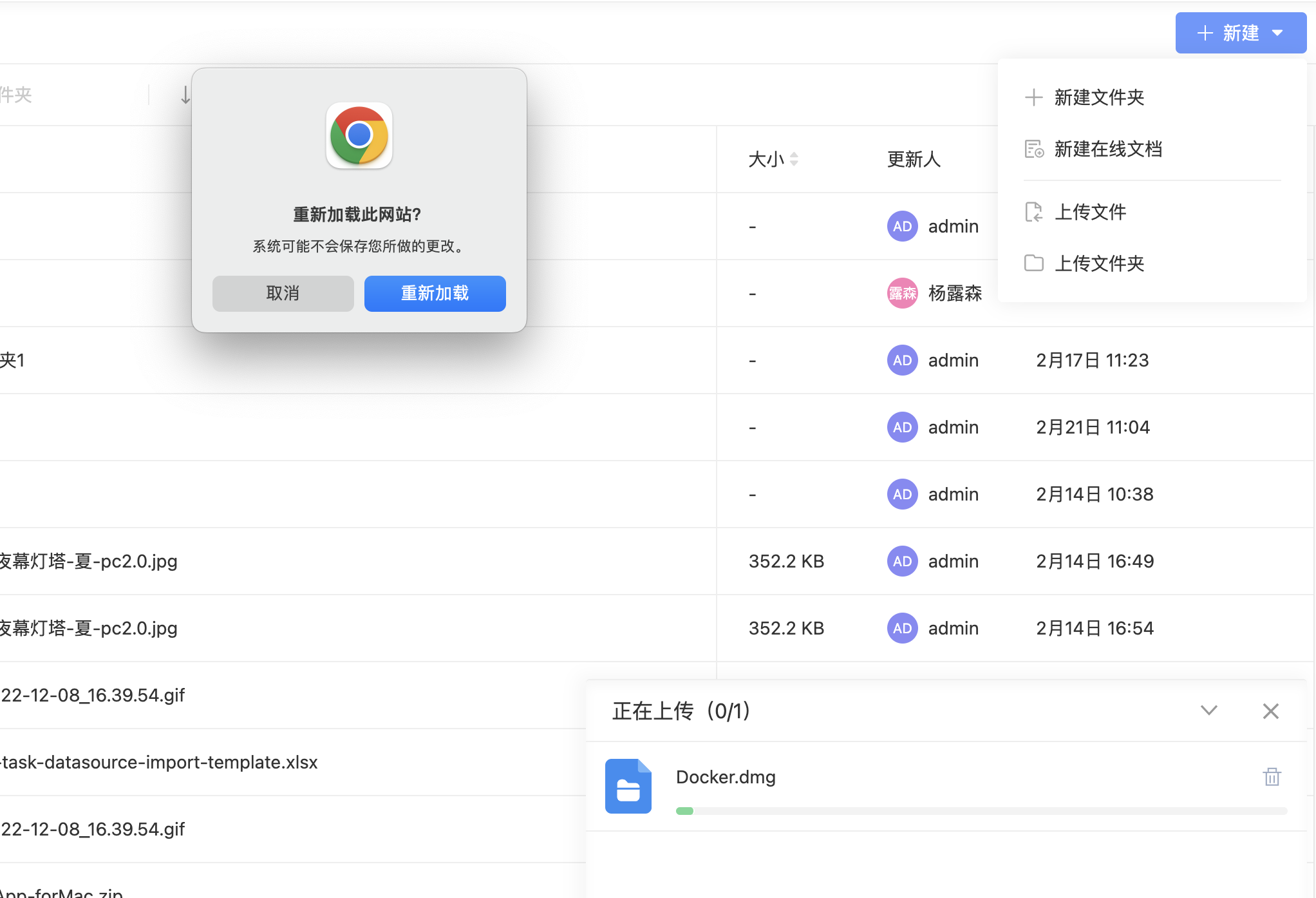
最近老是跟文件上传打交道,趁着搞完需求的间隙,整理一下拖了好久的文章,浅析 Angular 中的文件上传进度监控的原理。其主要的核心是利用了 XMLHttpRequest 和 Observable 对象来实现的。
文件上传源码
1 2 3 4 5 6 7 8 9 10 11 12 13 14 15 16 17 18 this .ensureFileName(uploadFile);return new Observable(observer => {const { xhr, cleanup } = this .uploadByXhr(observer, uploadFile);return () => {if (xhr.readyState !== xhr.DONE) {
1
2
3
4
5
6
7
8
9
10
11
12
13
14
15
16
17
18
19
20
21
22
23
24
25
26
27
28
29
30
31
32
33
34
35
36
37
38
39
40
41
42
43
44
45
46
47
48
49
50
51
52
53
54
55
56
57
58
59
60
61
62
63
64
65
66
67
68
69
70
71
72
73
74
75
76
77
78
79
80
81
82
83
84
85
86
87
88
89
90
91
92
93
94
95
96
97
98
99
100
101
102
103
104
private uploadByXhr (observer: Subscriber<ThyUploadResponse>, uploadFile: ThyUploadFile )const xhr = this .xhrFactory.build();const time: number = new Date ().getTime();let speed = 0 ;let estimatedTime: number | null = null ;status : ThyUploadStatus.started,percentage : 0 ,startTime : timeconst onProgress = (event: ProgressEvent): void =>if (event.lengthComputable) {let percentage = Math .round((event.loaded * 100 ) / event.total);if (percentage === 100 ) {99 ;const diff = new Date ().getTime() - time;Math .round((event.loaded / diff) * 1000 );const progressStartTime = (uploadFile.progress && uploadFile.progress.startTime) || new Date ().getTime();Math .ceil((event.total - event.loaded) / speed);`${humanizeBytes(speed, false , 2 )} /s` ;this .secondsToHuman(estimatedTime);status : ThyUploadStatus.uploading, uploadFile : uploadFile });const onError = (error: ErrorEvent ) => observer.error(error);const onReadyStateChange = () => {if (xhr.readyState === XMLHttpRequest.DONE) {const speedTime = (new Date ().getTime() - uploadFile.progress.startTime) * 1000 ;const speedAverage = Math .round(uploadFile.nativeFile.size / speedTime);100 ;`${humanizeBytes(speed, false , 2 )} /s` ;this .secondsToHuman(estimatedTime || 0 );try {JSON .parse(xhr.response);catch (e) {status : ThyUploadStatus.done, uploadFile : uploadFile });'progress' , onProgress, false );'error' , onError);'timeout' , onError);'timeout' , onError);'readystatechange' , onReadyStateChange);true );true : false ;try {const formData = new FormData();Object .keys(uploadFile.data || {}).forEach(key =>Object .keys(uploadFile.headers || {}).forEach(key =>'file' , uploadFile.nativeFile, uploadFile.fileName);status : ThyUploadStatus.started, uploadFile : uploadFile });catch (error) {return {cleanup : () => {'progress' , onProgress);'error' , onError);'timeout' , onError);'timeout' , onError);'readystatechange' , onReadyStateChange);
1
2
3
private ensureFileName(uploadFile : ThyUploadFile) { || uploadFile.nativeFile.name;
分析
代码看着挺长的,但是其逻辑不难,核心点就两个部分。
upload 方法返回了一个 ThyUploadResponse 类型的 Observable 可观察对象, 其构造函数传入一个 observer(观察者/订阅者),return了一个 unsubscribe 函数,用于取消订阅。
重点是创建 Observable 时的回调函数,它里面调用了最关键的 uploadByXhr(observer, uploadFile) 方法,其中把观察者 observer 和 文件详情对象 uploadFile 作为参数传了进去。
注入 XhrFactory 服务,调用 build() 函数获取 XMLHttpRequest 对象
定义了 progress、error、readystatechange 事件的回调函数
调用 open() 实例化方法来创建一个新的请求
调用 send() 实例化方法来发送 HTTP 请求,数据体为 FormData 类型
最后 return 出去一个包含 XMLHttpRequest 对象和一个用于取消监听的函数
最后看一下 upload() 函数中 return 的 unsubscribe 函数中都干了些啥?
progress 事件会在请求接收到数据的时候被周期性触发,ProgressEvent.loaded 只读属性是一个整数,表示底层的进程已经执行的工作量,可以使用该属性和 ProgressEvent.total 计算完成工作的比率。
由于 progress 事件会周期性的传输数据,所以调用 upload 函数的时候也会周期性的接受到数据,返回值中已经有计算好的各种数值,就可以拿来直接展示了。
与上传有关的类
上述分析中简单的涉及了一些类和函数,下面来系统的看一下。
XMLHttpRequest
其实例方法、事件比较多,可参考:使用XMLHttpRequest
ProgressEvent
ProgressEvent 接口是测量如 HTTP 请求(一个XMLHttpRequest,或者一个 img,audio,video,style 或 link 等底层资源的加载)等底层流程进度的事件。
实例属性
lengthComputable
loaded
total
FormData 接口提供了一种表示表单数据的键值对 key/value 的构造方式,并且可以轻松的将数据通过XMLHttpRequest.send() 方法发送出去,本接口和此方法都相当简单直接。如果送出时的编码类型被设为 “multipart/form-data”,它会使用和表单一样的格式。
实例方法
append()
set()
set() 和 FormData.append 不同之处在于:如果某个 key 已经存在,set() 会直接覆盖所有该 key 对应的值,而 FormData.append 则是在该 key 的最后位置再追加一个值。
功能优化
通常涉及到文件上传功能时,当离开页面时如果还有正在上传的文件,则需要给用户友好的提示。如:
1
2
3
4
5
6
7
8
9
10
11
12
13
14
15
16
17
18
19
20
21
22
23
24
initBeforeunload (window ,'beforeunload' )this .$unSubscribe))e =>const queues = Object .values(this .queues);const isUploading = queues.find(queue =>return queue?.find(item =>return item?.result?.status === ThyUploadStatus.started || item?.result?.status === ThyUploadStatus.uploading;if (isUploading) {window .event;const tips = this .util.translate.instant('validation.BEFOREUNLOAD_CHECK' );if (e) {true ;return tips;else {this .$unSubscribe.next(0 );this .$unSubscribe.complete();
Window: beforeunload event
当浏览器窗口关闭或者刷新时,会触发 beforeunload 事件。当前页面不会直接关闭,可以点击确定按钮关闭或刷新,也可以取消关闭或刷新。
注意
根据规范,要显示确认对话框,事件处理程序需要在事件上调用preventDefault(),不加不生效。
并非所有浏览器都支持此方法,而有些浏览器需要事件处理程序实现两个遗留方法中的一个作为代替,所以最好做一下浏览器的兼容:
某些浏览器过去在确认对话框中显示返回的字符串,从而使事件处理程序能够向用户显示自定义消息。但是,此方法已被弃用,并且在大多数浏览器中不再支持。
在 beforeunload 事件中,window 对象的 alert、confirm等方法无效。