写在前面 👣
angular是一个非常优秀的前端框架,但是各种语法和api也是相对较多,掌握一些开发技巧可以使我们写的代码看起来更优雅,我接触angular开发三年有余,加入我们worktile团队也有一段时间了,不管是通过自己学习还是参考研究前辈写的代码,学到了很多新的知识,正好借此机会来一波总结。
工具篇 🛠️
俗话说工欲善其事,必先利其器。先推荐几个我装机必备的软件和插件。
utools 软件
提高生产力的工具,轻量、安全、简洁、无广告。
FeHelper 浏览器插件
前端助手
沙拉查词
Saladict 沙拉查词是一款专业划词翻译扩展,为交叉阅读而生。大量权威词典涵盖中英日韩法德西语。
js/ts 篇 🎃
求数组中的总和、最大最小值
const array = [1 ,2 ,3 ,4 ,5 ];
1 array.reduce((pre,cur ) => pre + cur);
1 array.reduce((pre,cur ) => pre > cur ? pre : cur);
1 array.reduce((pre,cur ) => pre < cur ? pre : cur);
过滤出数组中的真值
参数值为 0 、 -0 、 null 、 false 、 NaN 、 undefined ,或空字符串( “” ),则该对象具
有的初始值为 false
1
2
3
4
5
6
7
8
9
const array = [0 ,-0 ,null ,false ,NaN ,undefined ,"" ,1 ,2 ,3 ];Boolean );
去除数组中重复值
1
2
3
4
5
const array = [a,b,c,d,1 ,2 ,3 ,a,e,f,1 ];(item,idx ) => array.indexOf(item) === idx);Set (array)]
三元运算符和空合并运算符(??)
三元运算符大家经常用,但是有时候或许空合并运算符才是最佳选择。
空合并运算符 (??) 是一个逻辑运算符,当其左侧操作数为空或未定义时返回其右侧操作数,否则返回其左侧操作数。
1
2
3
4
5
const item: any = helpers.find(okrObjectiveType, { value : value.type });return item ? item.desc : '' ;return item?.desc ?? '' ;
展开语法
合并对象属性不要再用 Object.assign() 属性啦
展开对象的语法和 Object.assign() 行为一致,执行的都是浅拷贝 (只遍历一层)。但是语法更简短,需要注
意的是 Object.assign() 函数会触发 setters ,而展开语法则不会。
1
2
3
4
5
6
7
8
9
10
11
const user = { name : 'Kapil Raghuwanshi' , gender : 'Male' const college = { primary : 'Mani Primary School' , secondary : 'Lass Secondary School' const summary = {...user,...college};
没有展开语法的时候,只能组合使用 push , splice , concat 等方法,来将已有数组元素变成新数组的一部分。有了展开语法,通过字面量方式,构造新数组会变得更简单、更优雅!
1
2
3
4
5
const parts = ['shoulders' , 'knees' ];const lyrics = ['head' , ...parts, 'and' , 'toes' ];
可选链
可选的链接 ?. 如果值在 ? 之前,则停止评估。为 undefined 或 null 并返回。
1 2 3 4 5 6 7 8 <thy-avatar class ="styx-body-title-doc-avatar" thyShowName ="true" [thySize ]="24" [thyName ]="detailInfo?.created_by?.display_name" [thySrc ]="detailInfo?.created_by?.avatar" [thyDisabled ]="detailInfo?.created_by?.uid | isDisabledMember" > </thy-avatar >
参数默认值
给函数参数设置默认值有时会很方便。
1
2
3
4
5
6
7
8
9
10
11
12
13
14
15
@Pipe ({ name : 'taskStateClass' })export class TaskStateClassPipe implements PipeTransform transform (type : number , prefix = 'wtf-' if (!type ) {return '' ;const stateConstantMap = helpers.keyBy(stateConstant, 'value' );const state = stateConstantMap[type ];let className = state ? state.className : '' ;if (prefix) {return className;
巧妙的使用结构赋值可以避免使用 any 类型
1
2
3
4
5
6
onViewFilter ($event: { config: MissionViewFilterConfigurationInfo; originConfig: MissionViewFilterConfigurationInfo } )if ($event.config.date_unit !== $event.originConfig.date_unit) {this .initDateRangeValue($event.config.date_unit);this .setDateRange();
padStart方法补0
getDate()、getMonth() 等api获取日期的值可能只有一位,常见的需求是格式化成两位数字
1
2
3
const date = new Date ().getDate(); const month = `${new Date ().getMonth()} ` .padStart(2 ,0 )
字符串转number类型快捷方法
一元的 + 号运算符相当于 Number() 方法。
先来回顾一下 JavaScript 中的原始值都有哪些:
JavaScript 中的原始值是指数字、字符串、布尔值、null和undefined。
1
2
3
4
5
6
7
8
9
10
11
12
13
14
15
16
17
18
19
20
21
22
23
24
25
+ undefined ; null ; true ; false ; '1' ; '-1' ; 'a1' ; new Date () valueOf : function (return 0 } }; a : () => {},valueOf : function (return this .a;toString : function (return 1 ;
Apply the following steps:
ToPrimitive会调用 [[DefaultValue]]内部方法
1.Let valueOf be the result of calling the [[Get]] internal method of object O with argument “valueOf”.
简单来说就是:如果传入的值是 object 类型的话,会先调用 Object.valueOf() 函数,如果其返回值属于原始值类型,那么就继续调用Number() 函数,否则会去调用 Object.toString() 函数,输入其返回值。
rxjs篇 🐇
使用takeUntil取消订阅
1
2
3
4
5
6
7
8
9
10
destroy$: Subject<any > = new Subject<any >();ngOnInit (this .destroy$)).subscribe();this .destroy$)).subscribe();this .destroy$)).subscribe();ngOnDestroy (this .destroy$.next(null );this .destroy$.complete();
扩展:其它批量取消订阅的方式
1
2
3
4
5
6
7
8
9
10
subscriptions: SubscriptionLike[] = [];ngOnInit (this .subscriptions.push(request.subscribe(...));this .subscriptions.push(request.subscribe(...));this .subscriptions.push(request.subscribe(...));ngOnDestroy (this .subscriptions.forEach((subscription ) => subscription.unsubscribe());
关于 SubscriptionLike 类型:
1
2
3
4
5
6
7
interface SubscriptionLike extends Unsubscribable {boolean void void
其实现类:
Subject、BehaviorSubject、ReplySubject、AsyncSubject、Subscription、Subscriber
1
2
3
4
5
6
7
8
9
subscriptions: Subscription = new Subscription();ngOnInit (this .subscriptions.add(request.subscribe(...));this .subscriptions.add(request.subscribe(...));this .subscriptions.add(request.subscribe(...));ngOnDestroy (this .subscriptions.unsubscribe();
forkJoin连接多个请求
当有一组 observables,但你只关心每个 observable 最后发出的值时,此操作符是最适合的。此操作符的一个常见用例是在页面加载(或其他事件)时你希望发起多个请求,并在所有请求都响应后再采取行动。
distinctUntilChanged去除重复数据
只有当当前值与之前最后一个值不同时才会发出。distinctUntilChanged 默认使用 === 进行比较
finalize/finally
当Observable完成或者报错时调用。
switchMap
当前一个订阅未完成时,又发出新的订阅,则会取消之前订阅。
Demo------Typehead 搜索:
类型头搜索是一种通过文本逐步搜索和过滤的方法。它有时也被称为自动完成,增量搜索,搜索作为你的类型,内联搜索,即时搜索和字轮。
关于类型头搜索优化的demo之前文章有专门写过
扩展:concatMap、mergeMap、switchMap和exhaustMap的使用区别和使用场景
Angular语法篇 👼
合理使用 ngZone runOutsideAngular 来提升应用性能 我们知道Angular可以自动处理变化检测,这是因为它使用了 zone.js ,简单的来说, zone.js 就是通过打补丁的方式来拦截浏览器的事件,然后进行变化检测,但是变化检测是极其消耗资源的,如果绑定了大量的事件,那么就会造成性能问题,所以我们可以使用 runOutsideAngular 来减少不必要的变化检测。
1
2
3
4
5
6
7
8
9
10
11
this .ngZone.runOutsideAngular(() => {this .renderer.listen(this .elementRef.nativeElement, 'keydown' , event =>const keyCode = event.which || event.keyCode;if (keyCode === keycodes.ENTER) {this .ngZone.run(() => {this .thyEnter.emit(event);
@ViewChild 读取指定类型的实例
1 <input #input thyInput [thyAutofocus ]="true" />
上面这行代码有三个实例 ElementRef 、 ThyInputComponent 、 ThyAutoFocusDirective ,在某些情况下如果我们要获取指定类型的实例应该怎么做呢?
1 @ViewChild ('input' , { read :ThyInputComponent }) inputComponent : ThyInputComponent ;
动态绑定的样式或者类名如果只有一个时可以简写
1 2 3 <thy-list-item *ngFor ="let item of context" [class.active ]="item.isActive" [innerHTML ]="item.elementRef.nativeElement.innerHTML | bypassSecurityTrustHtml" > </thy-list-item >
其它 🍢
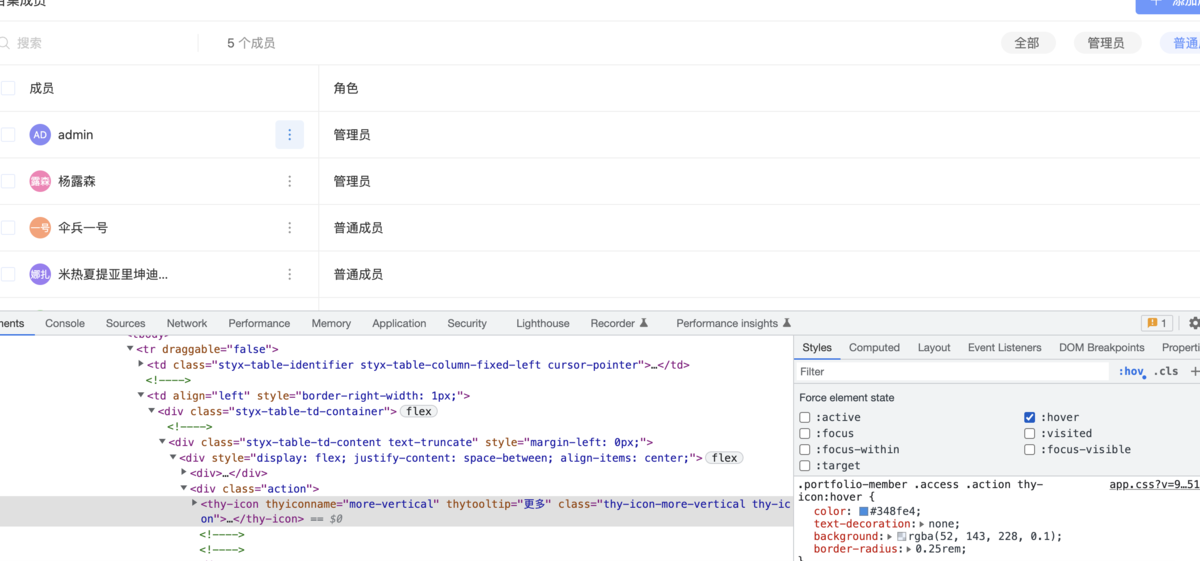
如何浏览器中调试元素的 hover 样式
使用 git 命令的 git cherry-pick 把一个分支的部分commit应用到其他的分支上。
1
2
3
4
5
git cherry-pick commitHash